
AI Book Cover Generator

WizGenerator's AI Book Cover Generator turns book details into four front-cover image variations with genre and typography-space controls.

Verified tool facts

Best for

Authors and publishers who need four front-cover visual directions from a title, genre, atmosphere, and premise.

Cost
Free
Sign-up
Not required
Input
Title, genre, atmosphere
Images
4 variations
Ratios
3 choices
Action
Download
Not for

Full print wraps, spine or barcode layout, exact typography, platform acceptance, rights clearance, or book writing.

Quick-fill an example

Your Book Cover Variations

Ready
Saved AI example

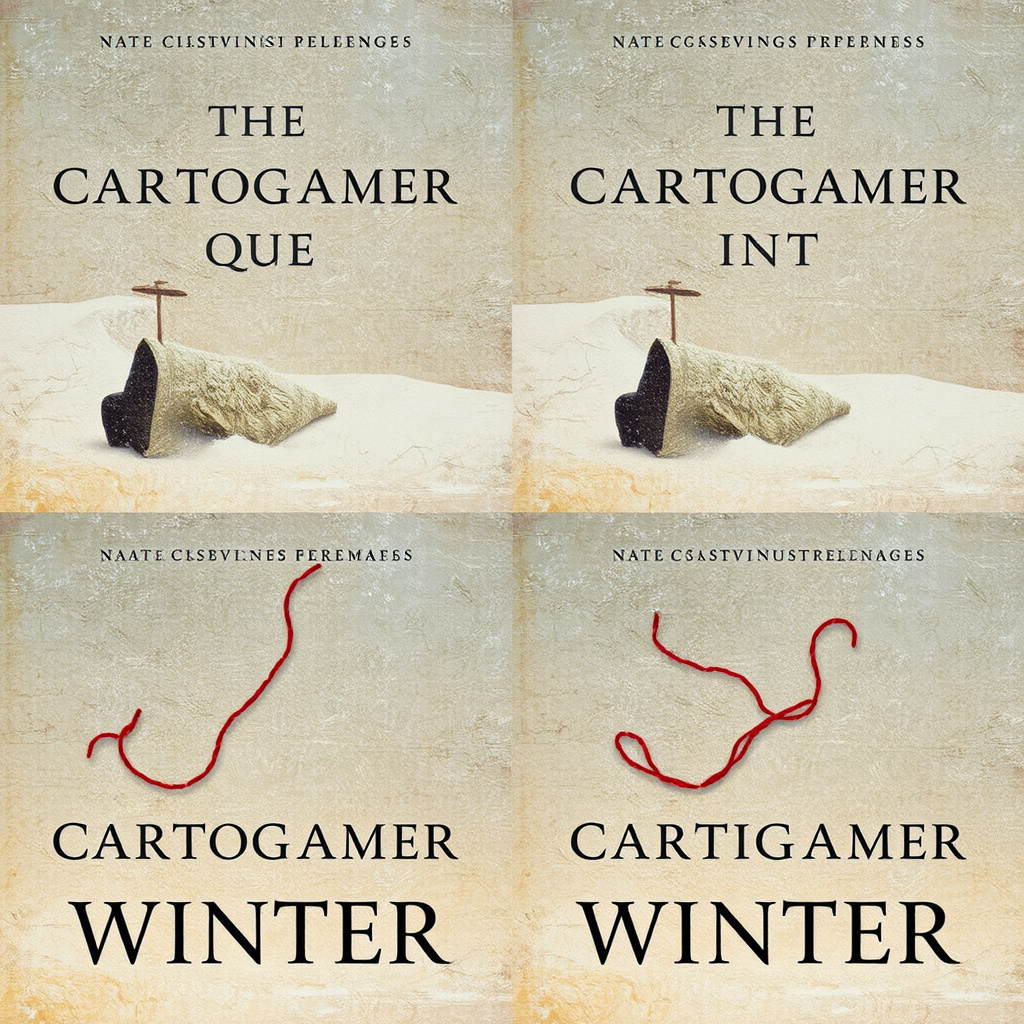
Generated by the live AI Book Cover Generator from the selected sample. Generate again to replace it with your own result.

Generated image direction 1
Direction 1
Advertisement

Signal the Reading Experience at a Glance

Make the Cover Promise the Right Reading Experience

Readers often decide whether to investigate a book from a small image and a few visual signals. Title, genre, audience, and atmosphere should point toward the experience the book actually offers. A literary mystery, practical guide, and middle-grade adventure need different levels of tension, clarity, texture, and visual distance even when they share a familiar object.

Add a premise or visual metaphor when the genre label is too broad. A folded map under snow can carry a quiet mystery more precisely than a generic magnifying glass. Use the brief as a promise, not a plot summary. The image should invite the right reader without inventing a character, setting, review, or author biography that the book does not contain.

Design for Thumbnail Recognition

A cover must still communicate when it shrinks beside dozens of other books. Give the image one focal idea, a readable contrast, and a shape that survives a small display. Audience and genre help decide whether the cover needs a bold central object, a restrained atmosphere, a clear character silhouette, or a confident geometric hierarchy.

Do not crowd the frame with every premise detail. Select the object or relationship that tells the reader where to look first, then protect enough negative space for the title and author line. A complicated scene may work at full size but disappear in a storefront thumbnail. Test the direction small before investing in final layout.

Reserve Space for Exact Book Metadata

Image models can distort a book title, author name, series number, or subtitle when they draw letters as part of the artwork. Choose a clean type area when the cover needs exact metadata, and plan to add those words in a separate design pass. Approximate lettering can suggest hierarchy or atmosphere, but it cannot replace a correctly spelled title or author line.

A front-cover concept is not a complete print wrap. Spine width, back-cover copy, barcode placement, trim, bleed, and file format depend on the edition and production route. Keep those decisions outside the image brief. The generator can explore the front image; the author, designer, or publisher prepares the deliverable that readers and distributors will actually receive.

Review Genre, Rights, and Production Fit

Inspect all four variations at full size and thumbnail size. Check the genre signal, premise, atmosphere, focal point, type area, palette, and exclusions. Look for accidental logos, familiar characters, recognizable people, borrowed cover imagery, misleading symbols, unreadable text, and details that change the book's implied audience or subject.

Prepare the final cover separately. Add exact typography, check ebook or print specifications, review trim and bleed when relevant, and confirm permission for any person, mark, image, or reference. The generator does not establish rights, platform acceptance, print calibration, educational value, or publication readiness. A human author, designer, publisher, or rights holder makes that decision.

Choose Cover Concepts or Production Layout

A cover generator explores a book's visual signal, while a design workspace handles exact type and layout and a publishing guide defines the final file requirements.

AlternativeChoose whenWatch for
Adobe Express book coversChoose when you need a broader template and layout workflow for final cover text and graphic elements.A design editor adds manual layout work and still leaves genre, premise, rights, and platform checks to the author.
Reedsy cover guidanceChoose when you need design principles for genre signal, hierarchy, and the elements of a cover.Guidance improves the decision but does not generate four visual directions from your own book brief.
Amazon KDP cover guideChoose when you need to check dimensions, bleed, spine, and file requirements for a final print cover.A production guide defines delivery constraints but does not create the cover concept or final typography.

AI Book Cover Generator Questions

Will it create a complete print cover with spine and back?
No. It creates four front-cover image directions. It does not calculate spine width, arrange back-cover copy, place a barcode, add bleed, or export a distributor-ready print wrap. Use a suitable design and production workflow after choosing a visual direction.

Will the book title and author name be readable?
Generated lettering may mis-shape book metadata. Reserve a quiet area for typesetting, then place the verified title, author, and series information with a layout tool. Treat characters produced inside the picture as placeholders and proofread the final type before release.

Can I use an existing cover or author photo as a reference?
This form uses written direction and has no reference-image input. Describe visual qualities and the book premise in text. A real-person likeness needs its own permission and review process; inspect the cover concept for accidental resemblance, recognizable people, logos, and borrowed artwork.

Can I request a specific author's cover style?
Name visual properties such as paper texture, contrast, framing, or color family. Do not request a living artist's signature look or reproduce an existing jacket. A human designer can turn the direction into a distinct cover that fits the book and its readers.

Can it make a KDP-ready cover?
KDP readiness lies outside the generator. It returns a front-cover concept, while trim size, bleed, spine width, resolution, file format, barcode, and acceptance require a separate production check. Consult the current guide for the edition you will publish before preparing the final file.

Does it write the book or synopsis?
No. The premise field gives the image brief enough context to shape the cover. The tool does not write the book, synopsis, back-cover copy, reviews, author biography, or marketing plan. Keep those tasks separate so the cover does not invent facts about the work.

Next Steps

Continue with a useful next action based on what you just created.

Prepare the Book for Readers

After choosing a visual direction, add exact title and author typography in a suitable design workflow, then check the format, rights, and platform requirements for the final cover.

Add this generator to any page with a simple embed.

Get embed code